
photos recovery techniques-
Kya hum deleted photos aur files sach-mein recover ya restore kar sakte hain?
Iska short answer hai — haan.
Photo Recovery Techniques: Deleted Photos Recover Karne Ke Best Methods
Aaj ke is article mein hum isi important topic par baat karenge. Aap jaanenge kuch photos recovery techniques, jinse delete ho chuki photos ko wapas pane ke chances hote hain. Saath hi, hum kuch smart prevention tips bhi discuss karenge, jinki madad se aap future mein photos delete hone ke bajay unka safe backup rakh sakenge.
Bahut se logon ko is baat ka idea hi nahi hota ki unki deleted photos ya koi bhi important file wapas restore ki ja sakti hai.
Jab kabhi unhe in files ki zarurat padti hai, tab unknown hone ki wajah se woh recovery try hi nahi kar paate aur soch lete hain ki data permanently delete ho chuka hai.
Sabhi photo recovery techniques samajhne se pehle yeh jaanna zaroori hai ki mobile ya PC mein photos kaise store hoti hain, woh exactly kahan save hoti hain, aur unhe delete karne ki process kya hoti hai.
To Process aisi hai :
1. Photos or Files store Kaise hoti hai ?
- Sabse pehle jab aap mobile camera se photo capture karte hain, kisi app ke through files receive karte hain, ya phir mobile ya PC par hi koi file create karte hain, to woh photo ya file device ki memory (storage) mein save ho jaati hai.
- Sabse pehle jab aap mobile camera se photo capture karte hain, kisi app ke through files receive karte hain, ya phir mobile ya PC par hi koi file create karte hain, to woh photo ya file device ki memory (storage) mein save ho jaati hai.
- Isi tarah se jab bhi koi photo ya file banti hai, woh apne related folder ke andar proper location par store ho jaati hai.
📌📌
2. Photos Delete kaise hoti hai ?
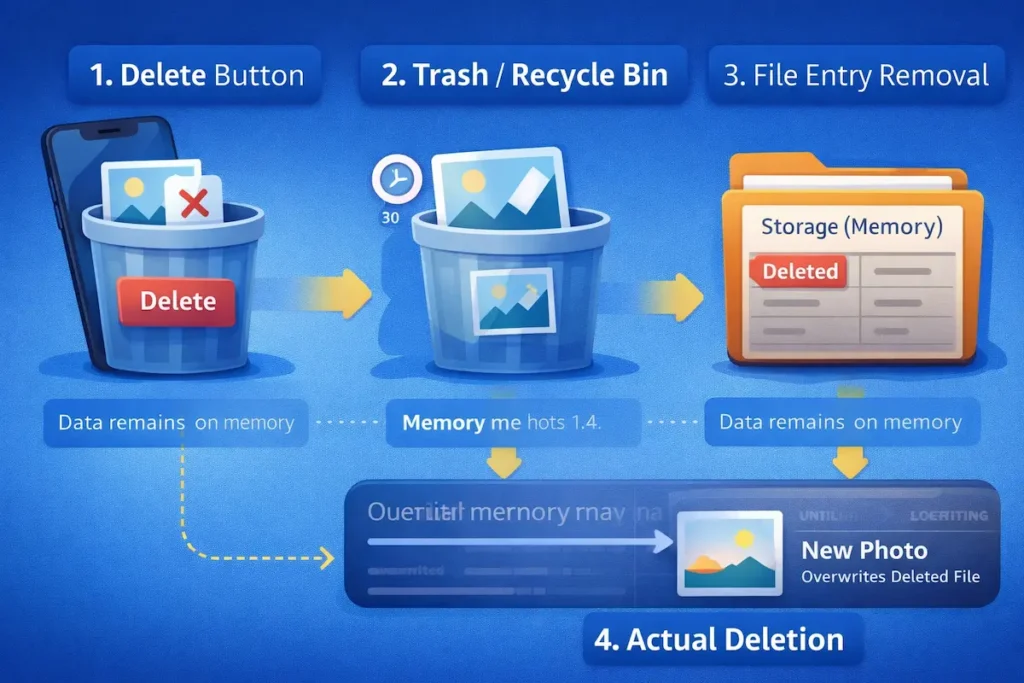
- Ab jab aap koi photo ya file mobile ya PC se delete karte ho, to asal me kya hota hai – chaliye samajhte hain
- 1. Delete Button Press karna
- Jab aap kisi photo ya file par Delete button press karte ho, to system us file ko “Deleted” mark kar deta hai.
Is wajah se photo ya file gallery ya folder me dikhai nahi deti, lekin uska actual data abhi bhi device ki memory me maujood hota hai. - 2. Trash/Recycle Bin me jana
- Delete hone ke baad, photo ya file:
- Mobile me Trash / Bin
- PC me Recycle Bin
- me chali jaati hai.
- Yahan file ko kuch dinon ke liye rakha jaata hai taaki user agar chahe to restore kar sake.
- 3. Storage se File entry removal
- Is step me system kya karta hai?
- Storage ke table (index) se file ka naam, location aur details remove kar deta hai
- Lekin actual photo/file ka data abhi bhi memory me hota hai
- Hum use isliye nahi dekh paate kyunki storage table me uska record ab available nahi hota.
- 4. Actual photo/file deletion
- Ab jab usi memory location par:
- Koi nayi photo
- Video
- App data
- save ho jaata hai, to purani deleted file ka data overwrite ho jaata hai.
- 👉 Isi process ko kehte hain actual ya permanent deletion.
- Iske baad purani photo ya file recover hona lagbhag impossible ho jaata hai.
📌📌
*Here is following the flow of Image deletion from device-
** Techniques for Photos or File Recovery/Restore
📌📌
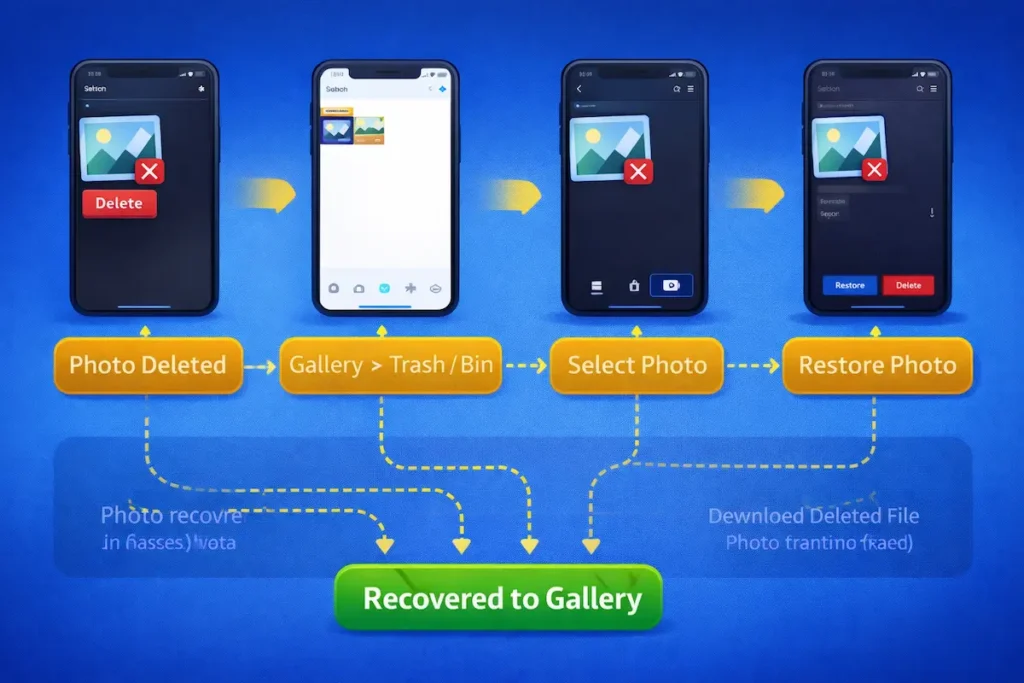
1.Trash / Recycle Bin Check Kare (Sabse Pehle)
Photos Delete hone bad :
- Mobile me Gallery Trash/ Bin me chale jate hai
- PC me Recycle Bin me jate hai
In dono me Deleted photos jyadatr 30 to 60 days ke liye rahte hai aur isi samay tak hum ye photos restore kr sakte hai bina kisi other software ke ya pareshani ke.
To restore karne ke liye kya karna hai –
- For mobile – Photos Gallery me Trash/Bin open kare. Usame agar required photo hogi to restore ka button press kare us photo pr jakar .
- For PC – File Manager me jakar Recycle Bin pr jana hai. Vaha agar file ya photo hai to restore ka button press karna hai aur wo restore ho jayegi.
- 📌📌
📌📌
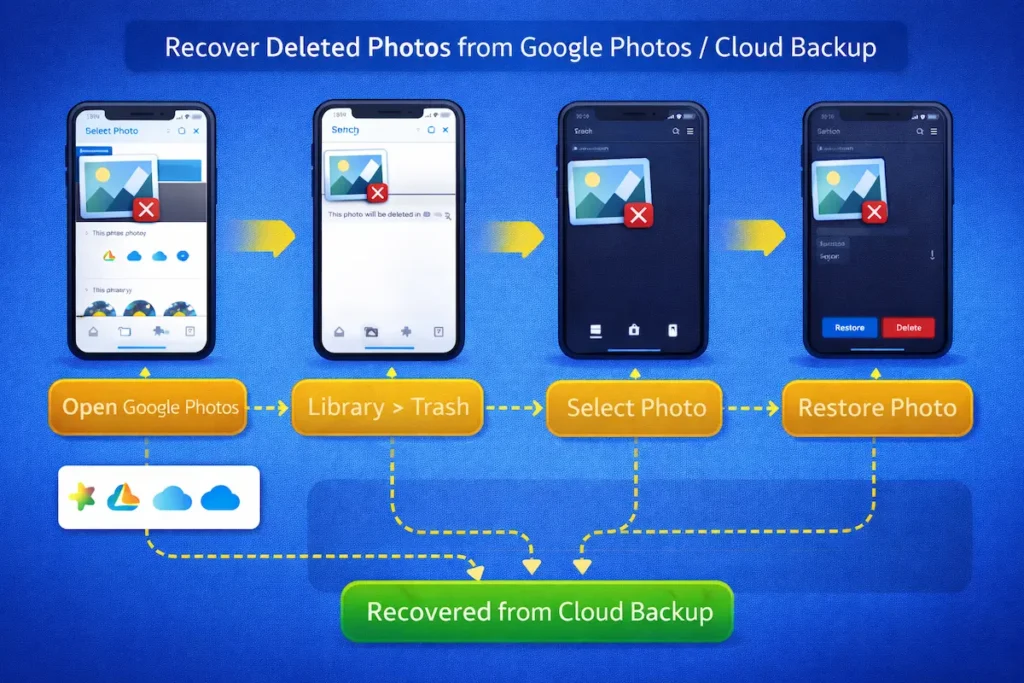
2. Google Photos / Cloud Backup Se Recover Kare
Agar aap :
- Google Photos
- Google Drive
- OneDrive
- iCloud
Use karte ho aur aapne setting me “auto backup” option on kr rakha hai to photos aur files automatically cloud pr store ho jati hai aur lost hone 100% bachti hai.
Steps(Google Photos):
- 1. Google photos app open karo
- 2. Go to Collection –> Bin
- 3. Photo select karo –> Restore
📌 Agar phone reset bhi ho gaya ho, tab bhi cloud se recover ho sakta hai.
Cloud Backup On karne ke liye ye kare –
- 1. Google Photos open karo
- 2. Profile pe jao
- 3. Photos Setting –> Backup
- 4. Gmai account choose karo
📌📌
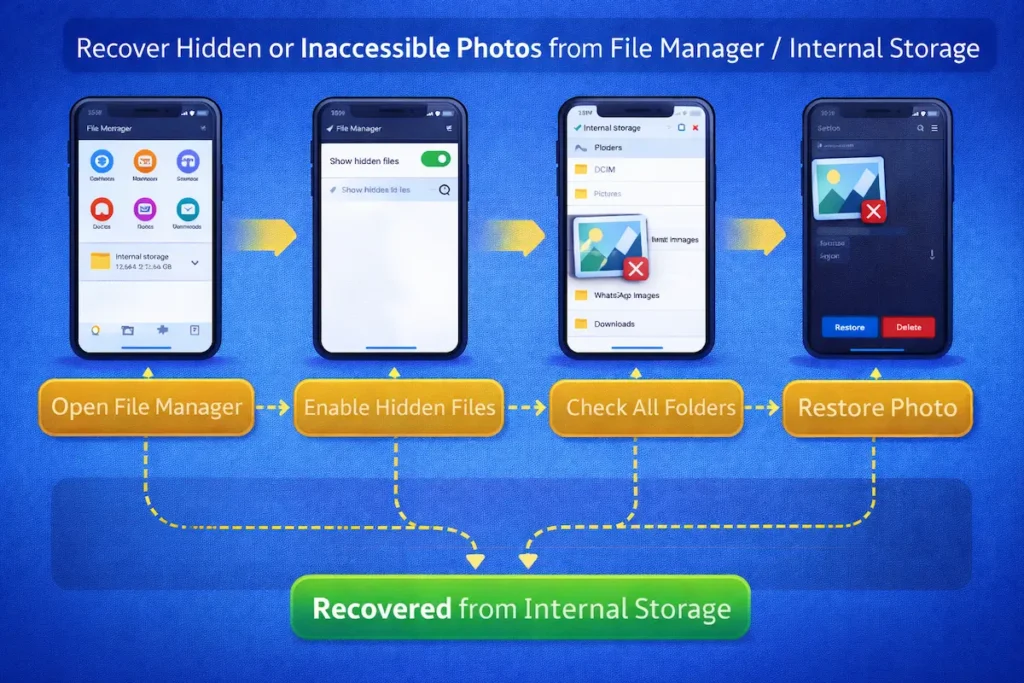
3. File Manager / Internal Storage Check Kare
Kabhi-Kabhi photos :
- DCIM
- Pictures
- Whatsap Images
- Downloads
In saare folders me photos hoti hai lekin gallery me show nahi hoti.
Kya kare –
- File Manager open karo
- Hidden files enable karo
- Sab folder check karo
👉 Ye case zyada tar gallery me bug hone ke karan hota hai.
📌📌
4. Photo Recovery Apps (for Android)
Agar photo recently delete hui hai aur Trash/Bin me bhi nhi hai to sabse best way hai third party app use kare. Ye apps aapaki puri physical storage memory ko scan karti hai aur puri photos aur files recovery ka option deti hai.
Popular Apps:
- DiskDigger
- Dr.Fone
- EaseUS MobiSaver
- Dumpster( Future Backup ke liye)
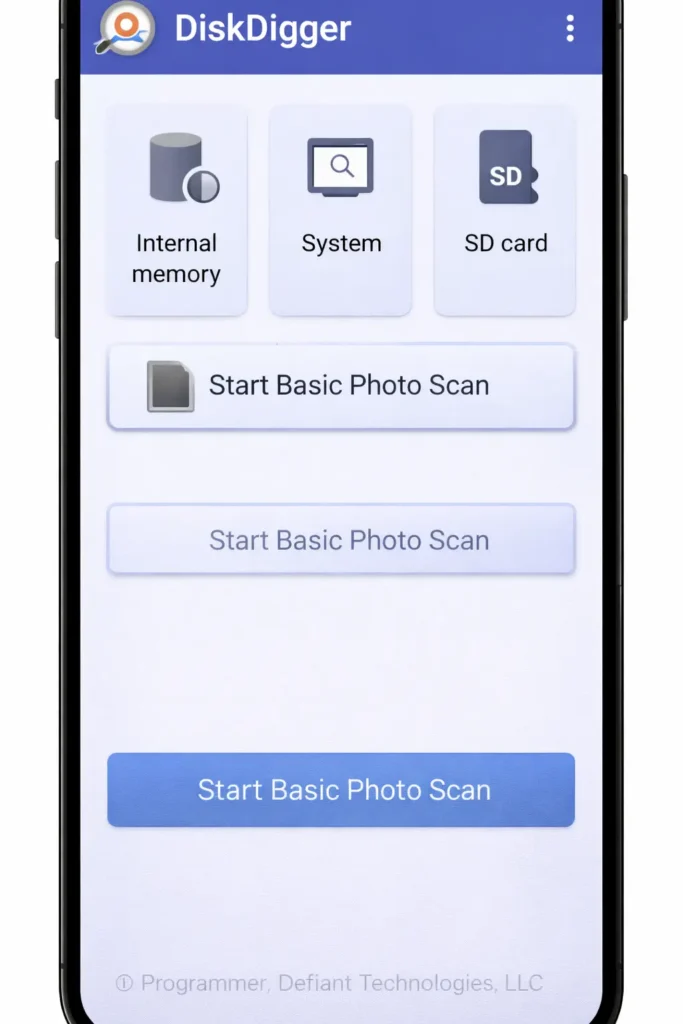
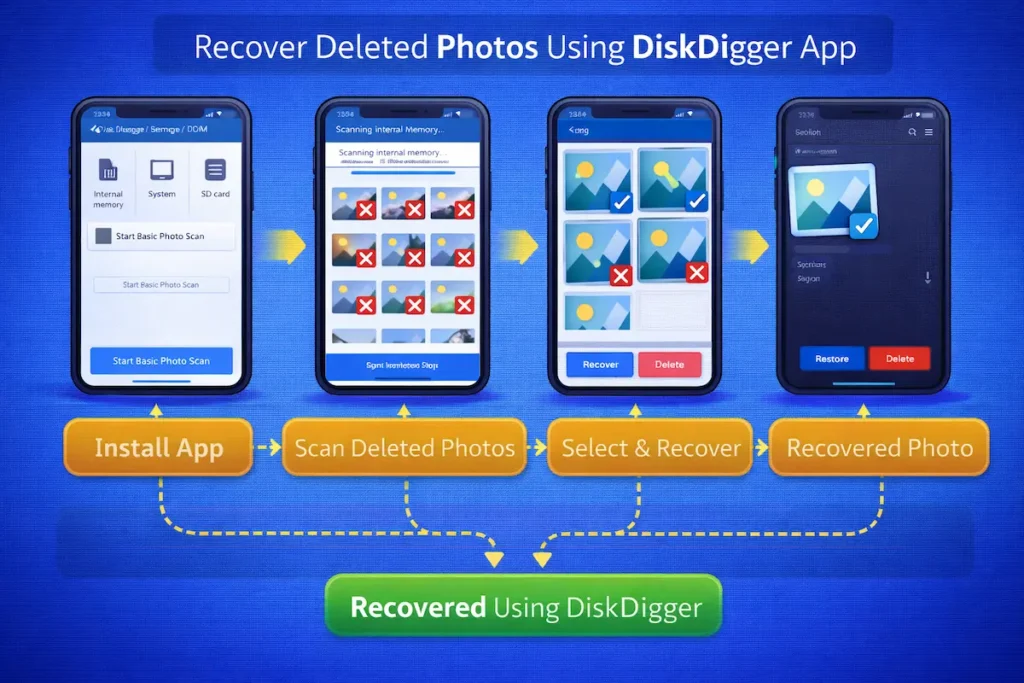
But sabse Best app we think is the DiskDigger. Below are some steps to recover from DiskDigger-
- 1. Download DiskDigger App from only Playstore
- 2.Turn OFF the internet connection of your mobile device or PC
- 3.There will be two options – Normal scan and Root scan
- 4.Do first one Normal scan
- 5.It will show up all the folders with contained files by categorizing on their type
- 6.Now select the photo or file if present and press the restore button
📌 Do not Root Scan because it will reset your mobile or PC device.
⚠️ Important Tips:
- Delete hone ke baad phone use kam karo
- Naye photos/video mat lo
- App turant install karo
📌📌
5.PC Software Se Recover Kare (Mobile → PC)
Agar phone PC se connect kar sakte ho:
Software:
- Recuva
- EaseUS Data Recovery
- Stellar Photo Recovery
Process:
- Phone ko PC se connect karo
- Storage access allow karo
- Software se scan karo
👉 Ye method SD Card recovery me zyada effective hota hai.
6. Professional Data Recovery Service (Last Option)
Agar photos:
- Bahut important hain
- Phone damage ho gaya hai
- Overwrite nahi hui hain
to professional recovery service help kar sakti hai.
⚠️ Ye method expensive hota hai aur success guaranteed nahi hoti.
🔧 Professional Data Recovery Services (Online / India)
1️⃣ Stellar Data Recovery (India)
- Website: Stellar® Data Recovery (India based)
- Recover karta hai:
- Mobile photos & videos
- Hard disk, SSD, pendrive, memory card
- Special:
- Android & iPhone recovery
- Physically damaged devices ke liye lab service
- 💰 Cost: Medium to High
2️⃣ Ontrack Data Recovery
- Global level service
- Recover karta hai:
- Deleted photos
- Damaged phones & storage devices
- Best for:
- Water damage
- Hardware failure cases
- 💰 Cost: High (Enterprise-level)
3️⃣ Local Authorized Mobile Service Centers
- Samsung / Xiaomi / Apple authorized centers
- Kabhi-kabhi limited recovery support dete hain (especially cloud-based)
⚠️ Important Warning
- Data recovery 100% guaranteed nahi hoti
- Overwritten data almost recover nahi hota
- Pehle free evaluation lo
- Fake online recovery websites se bachke raho
🔐 Photo Loss Se Bachne Ke Important Tips
Photos delete hone ke baad recovery mushkil ho jaati hai, isliye sabse best solution hai prevention. Neeche kuch practical tips diye gaye hain jo aapki photos ko safe rakhne me madad karenge 👇
1️⃣ Regular Backup Enable Rakhein
👉 Auto-backup ON rakhen taaki photos delete ya phone damage hone par bhi safe rahein.
2️⃣ Trash/Bin Empty Karne Se Pehle Check Karein
3️⃣ Unknown Cleaner Apps Se Bachein
✅ Sirf trusted apps hi install karein
❌ “One Tap Clean” jaise options avoid karein
4️⃣ Storage Full Hone Se Pehle Manage Karein
👉 Time-time par:
- Unwanted videos delete karein
- Photos cloud ya PC me shift karein
5️⃣ Phone Reset Karne Se Pehle Backup Zaroor Lein
Conclusion
Deleted photos ka loss kisi ke liye bhi stressful ho sakta hai, khaaskar jab wo photos important ya emotional ho. Lekin agar sahi time par sahi photo recovery techniques use ki jaayein, to deleted photos wapas milne ke chances kaafi had tak badh jaate hain. Is blog me humne detail me samjha ki photos delete hone ke baad actual me kya hota hai, kaun-kaun se recovery methods kaam karte hain, aur kin situations me recovery possible nahi hoti.
Chahe aap Trash/Recycle Bin, cloud backup, ya phir DiskDigger jaise recovery tools ka use karein — har method ka success is baat par depend karta hai ki photo delete hone ke baad kitna time ho chuka hai aur kya us storage par naya data overwrite ho gaya hai ya nahi. Isi wajah se sabse safe aur smart solution hamesha prevention aur regular backup hi hota hai.
Agar aap in photo recovery techniques ko sahi tarike se samajhkar apply karte hain aur saath hi backup ka habit bana lete hain, to future me important photos lose hone ka risk kaafi kam ho jaata hai.
⭐ Final Thought
Recovery ek emergency solution ho sakta hai, lekin backup ek permanent protection hota hai.
Agar aapko ye photo recovery techniques helpful lagi, to is post ko bookmark karein aur apne friends ke sath share karein. Saath hi, future me deleted photos recover karne ki problem se bachne ke liye regular backup aur safe digital habits zaroor follow karein.
To download “Diskdigger” for windows
👉 Read also: Digital Protection Tips to Stay Safe from Online Scam
Pingback: How to Check Aadhaar–PAN Link Status Online in 2 Minutes